

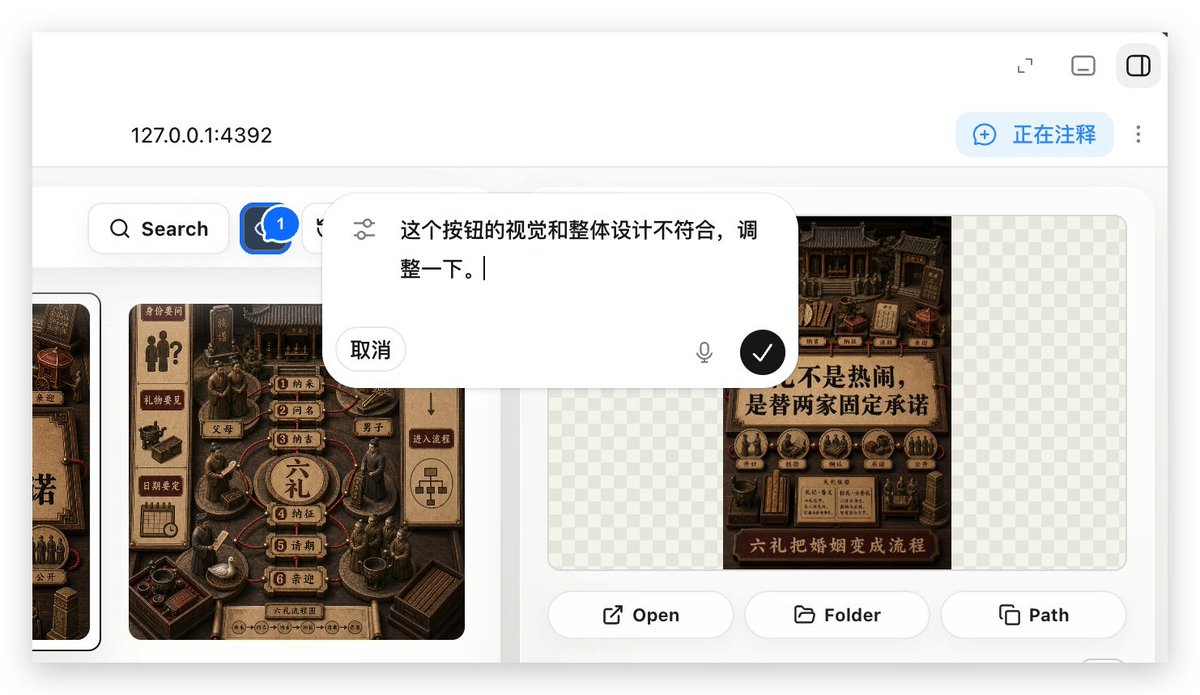
Using REFERENCE_0 as the context, create a follow-up screenshot that shows the selected “Build Web Apps” tool in action as a local web app preview. Replace the plugin list view with a browser-like localhost workspace at [local address], clean white UI, soft shadows, and rounded panels.

Main change: show an app-building/annotation interface rather than the original plugin directory. Add a top bar with the local address on the left and exactly 3 small window/control icons on the right. Add a blue annotation status pill on the upper right with the text [annotation status] and a vertical three-dot menu beside it.

Content area: create a gallery-style UI with Chinese poster/card designs inside rounded white panels. Include a left toolbar row with a Search button and a blue comment/annotation button carrying a badge labeled “1”. Show at least two visible poster/card thumbnails, using dark brown traditional Chinese visual styling, while leaving some checkerboard transparent-placeholder areas in the right panel.

Overlay: place a large floating rounded annotation input bubble centered near the top-middle of the content. It should look like an inline AI comment editor, with a sliders/settings icon on the left, Chinese instruction text [comment text], a “取消” cancel button, a small microphone icon, and a black circular confirm button with a white checkmark.

Bottom of the right preview panel: add exactly 3 action buttons labeled “Open”, “Folder”, and “Path”, each with a simple line icon. Keep the screenshot realistic, like a product demo of using Build Web Apps plus built-in HTML annotation to request UI refinements.



0 Comments
👥 Co-learning Circle 0
Observe other members' variables & configurations, and click "Study & Retry" to instantly import settings and practice!