

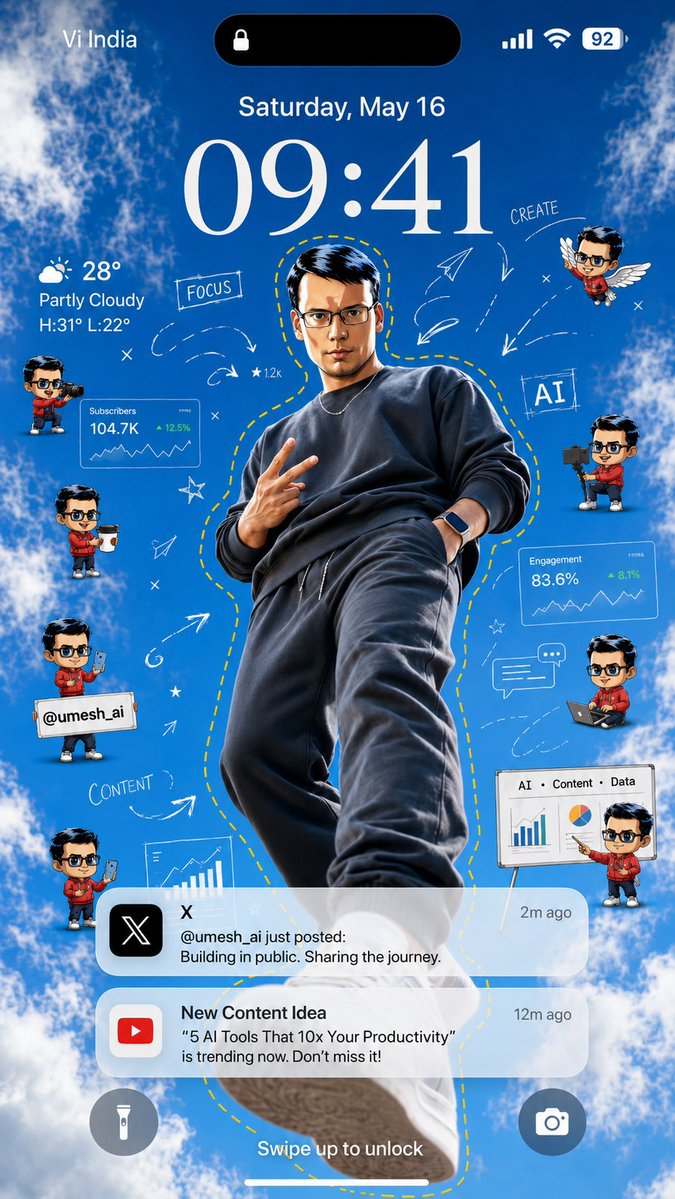
Goal: Create a vertical smartphone lock-screen wallpaper themed around a creator/AI productivity influencer, with an iPhone-style interface over a bright blue sky and clouds background.

Canvas: 9:16 vertical mobile wallpaper, realistic high-resolution composite, designed to look like a phone lock screen screenshot. Use a vivid daytime sky background with fluffy white clouds around the edges and a clear blue center.

Main subject: Place one full-body young male creator in the center, shot from a dramatic low angle as if standing above the viewer. He wears a dark charcoal sweatshirt, dark joggers, sneakers, a thin chain necklace, and a smartwatch. His pose is confident, one hand making a peace sign and the other in his pocket. Add a hand-drawn yellow dashed outline following his body silhouette. Use [creator handle] as the social handle shown in the design. Keep the face anonymized or softly blurred if needed.

Lock-screen UI: At the top, show carrier text “Vi India” on the left, a black Dynamic Island pill with a small lock icon in the center, and signal, Wi‑Fi, and battery “92” on the right. Below it, show the date “Saturday, May 16” and a very large elegant serif time reading [lock screen time]. On the left under the time, show weather: a partly cloudy icon, “28°”, “Partly Cloudy”, and “H:31° L:22°”. At the bottom, show two circular lock-screen buttons: flashlight on the left and camera on the right, plus the text “Swipe up to unlock” above the home indicator.

Floating creator elements: Include exactly 8 small chibi-style mini avatars of the same creator around the main figure, all with matching red hoodie and dark hair, faces anonymized if needed. Count and positions: 1 left upper holding a video camera, 1 left middle holding a takeaway coffee cup, 1 left lower holding a sign with “@umesh_ai”, 1 left bottom holding a smartphone, 1 right upper flying with white wings, 1 right middle holding a camera rig, 1 right lower sitting with a laptop, and 1 far right bottom presenting beside a whiteboard.

Analytics and creator graphics: Add exactly 4 data/creator panels: 1 translucent card labeled “Subscribers” with “104.7K” and “+12.5%”, 1 translucent card labeled “Engagement” with “83.6%” and “+8.1%”, 1 bottom-right whiteboard labeled “AI • Content • Data” with bar chart and pie chart, and 1 lower-left partial chart card showing a rising bar chart. Add hand-drawn white doodles around the subject: arrows, paper planes, stars, x marks, dashed motion trails, a chat bubble, and the handwritten words “FOCUS”, “CREATE”, “AI”, and “CONTENT”. Keep the doodles airy and sketch-like, not cluttered.

Notifications: Include exactly 2 rounded translucent notification banners near the lower third. First notification: black X app icon, title “X”, time “2m ago”, and message “@umesh_ai just posted: Building in public. Sharing the journey.” Second notification: red YouTube icon, title “New Content Idea”, time “12m ago”, and message ““5 AI Tools That 10x Your Productivity” is trending now. Don’t miss it!” Use [content idea text] for the quoted title.

Visual style: Bright, polished, viral social-media wallpaper aesthetic; realistic central subject mixed with cute 3D chibi avatars, semi-transparent iOS glassmorphism panels, crisp typography, white doodle overlays, and high contrast against the blue sky. Make it energetic, motivational, and creator-economy themed. Avoid extra watermarks or unrelated text.



0 Comments
👥 Co-learning Circle 0
Observe other members' variables & configurations, and click "Study & Retry" to instantly import settings and practice!